
Quick Sync and Multiple Calendars in One Spreadsheet With Sheets2GCal
Once a sheet is linked to a calendar, Sheets2GCal's Quick Import, Quick Export and Quick Sync repeat an import or export with the options you last used, without opening the sidebar. And one spreadsheet can hold a sheet for each calendar: Import All Sheets and Export All Sheets update them all at once.
This follows Edit Google Calendar Events in Google Sheets With Sheets2GCal. The video below starts at this part.
1. Quick Import, Quick Export and Quick Sync
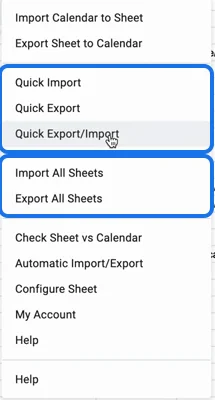
In Extensions, Sheets2GCal:
- Quick Import does the same as "Import Calendar to Sheet", with the options you last chose in its sidebar.
- Quick Export does the same as "Export Sheet to Calendar", with its options: guest notifications, and whether to keep deleted rows.
- Quick Sync exports, then imports. In the video it's still called "Quick Export/Import".
2. A sheet for each calendar
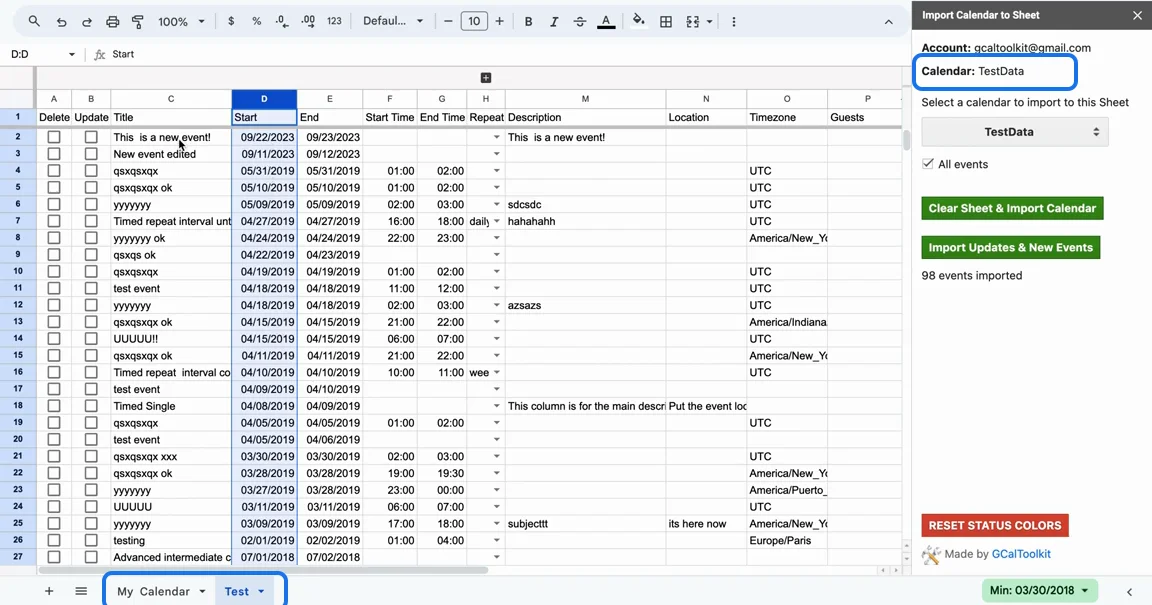
One spreadsheet can hold several sheets, each linked to its own calendar. Add a sheet, name it after the calendar, and import that calendar into it with "Import Calendar to Sheet", as you did for the first one. Sheets that aren't linked to a calendar can sit alongside them for anything else.
Switch between the sheets, and the sidebar shows the calendar linked to the one you're on.
3. Import or export every sheet
- Import All Sheets runs the import, with your usual options, on every sheet linked to a calendar.
- Export All Sheets exports every linked sheet, creating, updating and deleting the events whose boxes are ticked.
Next: Sync Google Sheets and Google Calendar Automatically.
Try it
Get Sheets2GCal to manage your Google Calendars from Google Sheets.